Direct Mappings (legacy)
We recommend using Catalogue mappings for new setups.
Direct mappings are still supported, but Catalogue mappings are the newer format and will receive new improvements going forward.
Read more in Catalogue mappings.
Migrating to Catalogue mappings
We released the improved version of mappings in July 2025 - Catalogue mappings. They have better support for the different classification schemes and solves problems that existed with Direct mappings
About
Using Catalogue mappings instead of Direct mappings is optional, but Direct mappings wont get further updates or new features. In addition, Catalogue mappings have been developed by taking previous support requests and bug reports into consideration, meaning, if you've experienced problems or limitations using Direct mappings in the past, they're likely to be fixed when using Catalogue mappings.
Comparison
| Library classification | Direct mappings | Catalogue mappings |
|---|---|---|
| SAB, Klartext | Truncation always enabled, no case sensitivity setting | Truncation and case sensitivity both configurable |
| Dewey | Shelf ranges, start + end values with optional CSV suffix | Start + end values with optional CSV suffix |
| Library of Congress | Shelf ranges, limited support for cutters beyond first decimal | Native support for class numbers, cutters and alphanumerical comparisons |
Setup strategy
We understand service disruptions should be avoided, therefore, Catalogue mappings can be setup while Direct mappings continue to match with library requests during the setup period.
With the the addition of Transformers, some workarounds that were previously needed for Direct mappings are no longer required, such as normalizing values or removing prefixes or suffixes from the values. For this reason, an automatic conversion between Direct mappings to Catalogue mappings is error prone, but could potentially be done.
Suggested setup flow
- Create Catalogue mappings to cover the different departments and shelving combinations
- Test request values to see if they match correctly by using tools like Analytics - Mapping request history and Test mapping values
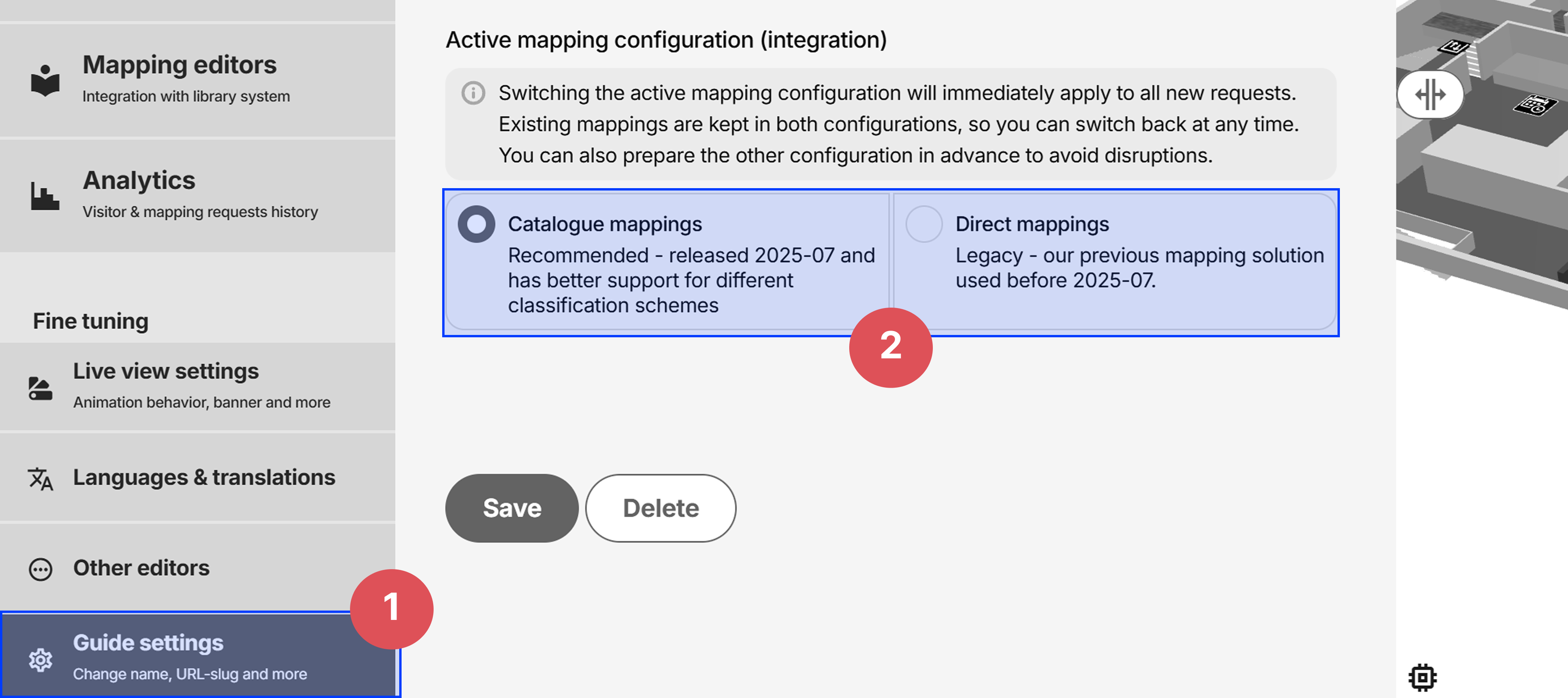
- When satisfied, make the switch to use Catalogue mappings under Guide settings:
If you need help or have further questions, feel free to contact us
Direct Mapping setup
Direct Mappings are used to match the incoming location information from the URL, and display the corresponding shelves in the 3D map.
Matching logic
Wagnerguide attempts to find the best match for the incoming location information by comparing Department, Location, Shelf and Sublocation in the existing Direct Mappings. Lets say there’s 10 Direct Mappings with Department xsbb and Location 15, Wagnerguide would then use the Shelf-value to distinguish between them.
Strategy
It can be useful to start with creating general Direct Mappings first, followed by specific. By general, we mean Direct Mappings that covers a large range of shelves, perhaps all the shelves in the adult department. Afterwards, more specific Direct Mappings can be added that can match more specific shelf call numbers inside the adult department.
Since the matching attempts to find the best match, the specific Direct Mappings would be prioritized above the general ones, should they both be matched. But for scenarios where the specific ones wasn't matched, the general ones are used as a fallback.
Editing a Direct Mapping
Either create a Direct Mapping, or click on an existing to edit.
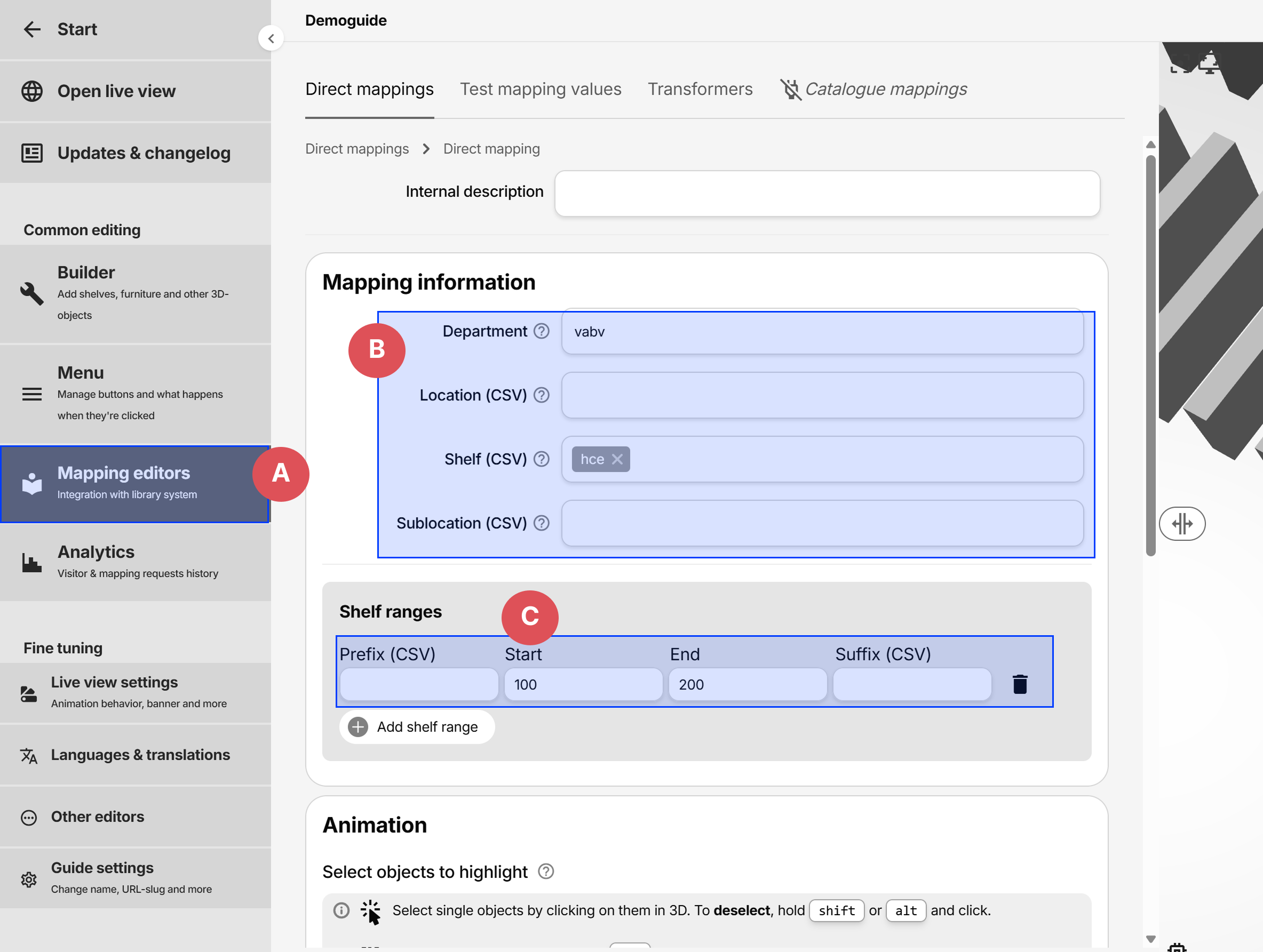
- A: Direct mappings are located under Mapping editors in the side menu.
- B: Classification values to match against
- C: Shelf ranges, mostly used for Dewey
Populate the fields that the Direct Mapping should match with, i.e. Department, Location, Shelf and/or Sublocation.
Depending on how the media is structured in the library, the fields are of varying importance. For example, if Location and Shelf can uniquely identify a shelf, Department wont be needed.
Department
The primary dividing value, such as department for adult or youth.
Location
Sometimes used instead of Department.
Shelf
If Library of Congress or Dewey is used, use the Shelf ranges instead of the Shelf field
Shelf truncation logic
Wagnerguide has a truncation logic built when matching the Shelf value. To match with all Shelves starting with a series of characters, such as Hc, the Shelf value in a Direct Mapping could be set to hc, which would match with hcf, hca, hceb, hcabc, etc, since they all start with hc.
Comma separated values
The Shelf and Location fields allows for Comma Separated Values, like so: hcf,hga,hgb,hbc.
This would match any codes starting with any of the following
hcf– like Hcfa, Hcffe, Hcfhga– like Hga, Hgab123, Hgaaahgb– like Hgba, Hgbxyzabchbc– like Hbc, Hbcaabbcc, Hbc321
Shelf ranges
Shelf ranges was created to help with with range based classification systems, such as LoC and Dewey.
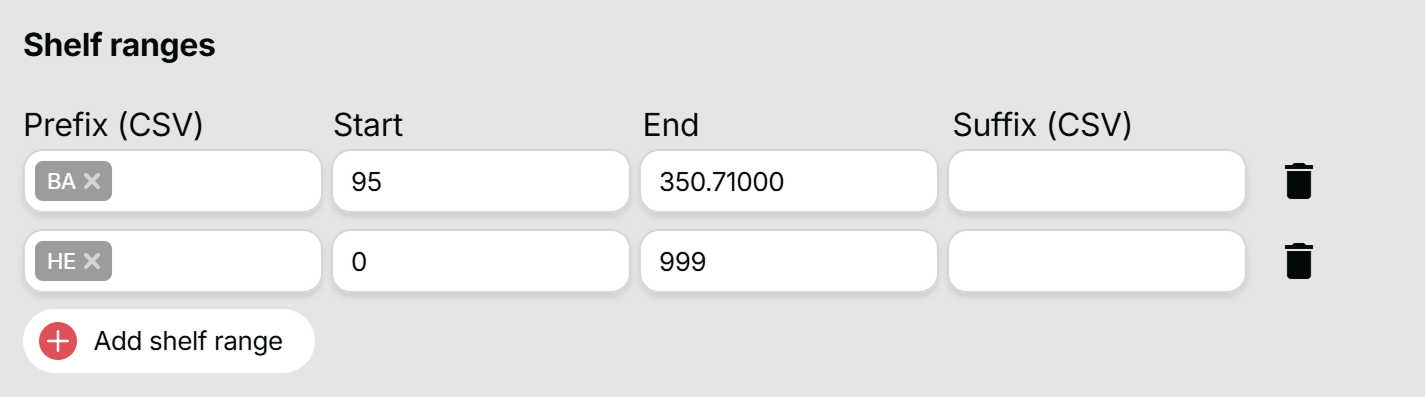
In the example above, the following Shelf numbers would be matched:
BA95,BA101,BA300,BA350.65HE100,HE150.12,HE900
Hower, the following would not be matched:
BA15- since 15 is below the start 95BA350.72- since 350.72 is above the end 350.71BA350.711- since 350.711 is above the end 350.71HE- since theres no range present
If there's a gap in the range, multiple Shelf ranges with the same Prefix but with different Start and End can be created.
Sublocation
Seldom used, could be the first letter in the author's last name.
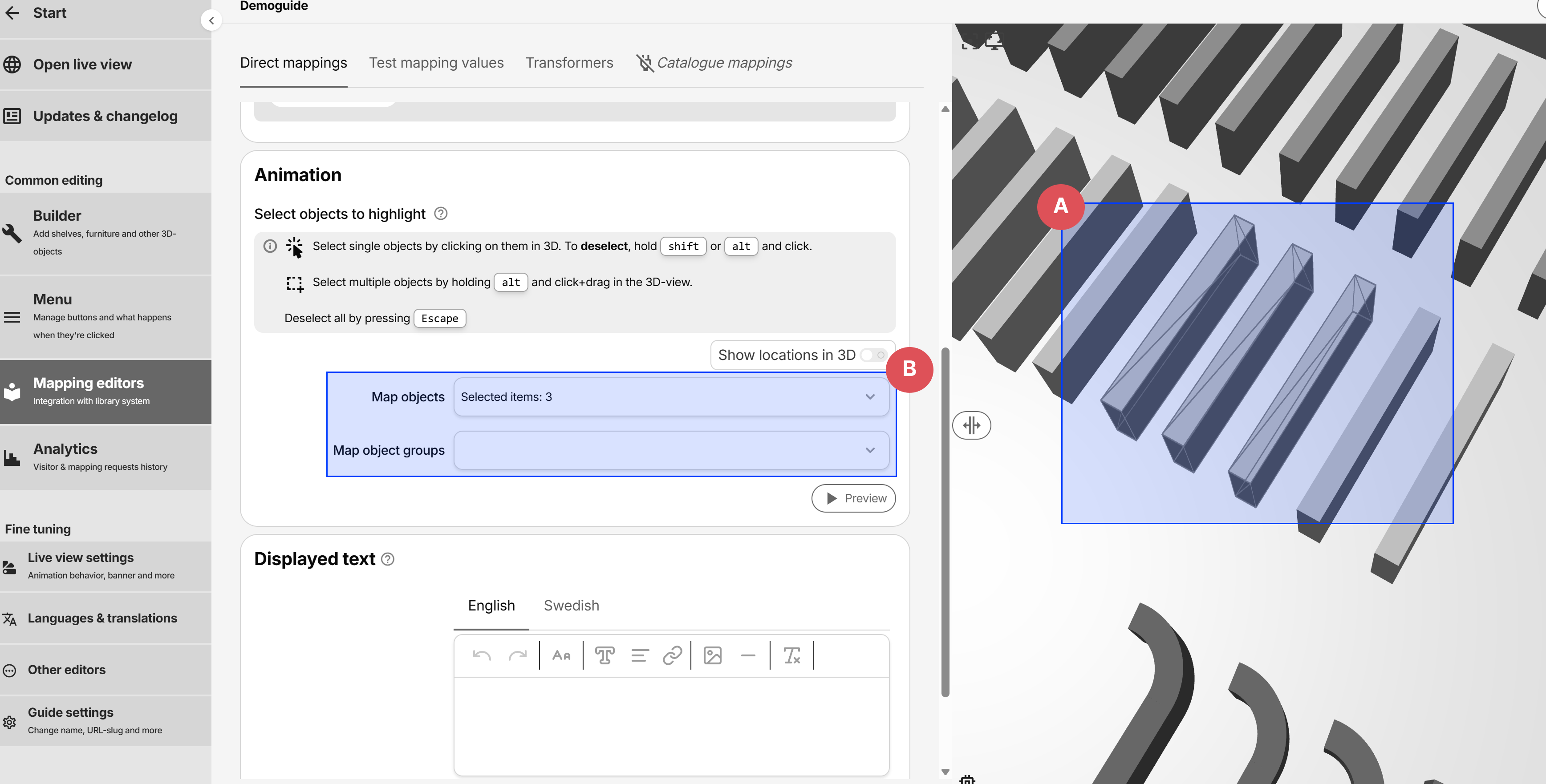
Highlight shelves via the Animation
When a direct mapping is matched, the objects assigned to its animation are highlighted in the 3D-view. To add an object to the animation, simply click the 3D-object to add, or hold alt and click to deselect. You may also hold shift to multi-select in the 3D-view, or click Esc to deselect all.